
Predictable usage, spend, and plan controls
See credits used vs included, cap overage, and keep invoices and plans in one place—scoped to your organisation so every project stays on budget.
What's inside
Usage clarity
Track credits used vs included plus per-operation tokens and cost so finance and ops stay aligned.
Spend guardrails
Overage toggles and monthly caps keep projects predictable without pausing work.
Invoice-ready
Download invoices and export logs to CSV for reconciliation and compliance.
See usage and spend in one view
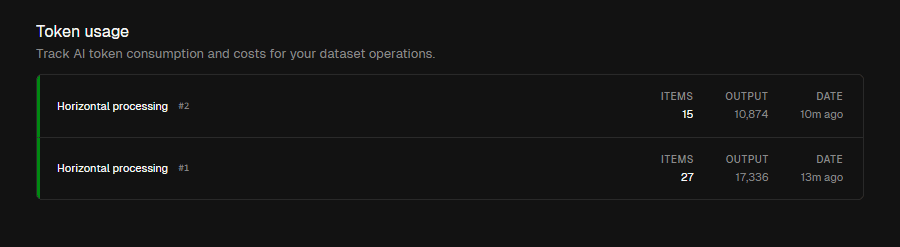
Monitor credits, overage, and per-run tokens with exportable logs for finance reviews.
From plan selection to clean invoices
Pick the right plan
Free, Pro, Business, Enterprise
Choose monthly or annual cadence and see inclusions before you commit.
Set guardrails
Overage toggle and monthly caps
Keep spend predictable with org-level controls that cover every project.
Monitor and export
Per-run logs with CSV export
Review tokens and cost per operation, then export logs for finance and compliance.
Credits, tokens, and cost at a glance
See credits used vs included, overage spend, and per-operation logs in one pane. Export to CSV when finance needs a record.
Per-operation breakdown
Inspect tokens and cost per run so teams see which jobs drive spend.
Included vs overage
Track included credits, current overage, and how close you are to caps.
CSV exports
Export usage logs for finance reviews or to reconcile with invoices.
Related pages
Overage toggles and monthly caps keep spend predictable
Toggle overage, set monthly caps, and keep controls at the org level so every project inherits the same guardrails.
Overage on/off
Decide whether to allow overage, with instant control from billing settings.
Monthly caps
Set a monthly spend limit to protect budgets during peaks.
Org-scoped
Controls apply to the selected organisation, so projects stay aligned automatically.
Related pages
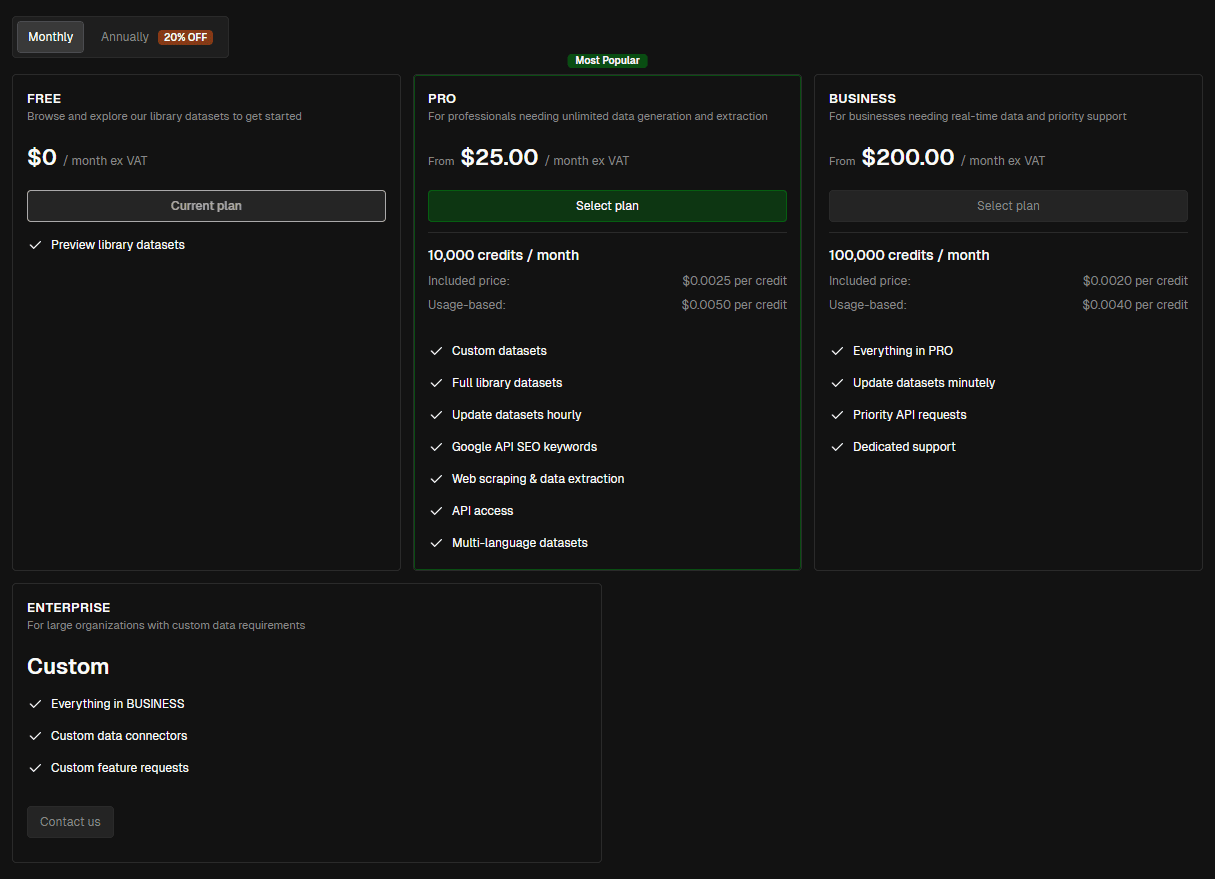

Free, Pro, Business, Enterprise with monthly or annual billing
Pick the tier that fits your volume—credits included per plan with transparent per-credit overage and 20% savings on annual.
Plan inclusions
See credits/month and feature unlocks per tier before upgrading.
Monthly or annual
Switch cadence anytime; annual reflects automatic savings.
Upgrade path
Move from Free to Pro/Business or reach out for Enterprise with custom data connectors and support.
Related pages
Keep invoices and payment details in one place
View current plan status, download invoices, and manage payment details without leaving the platform.
Invoice history
Download past invoices for reconciliation and compliance.
Payment details
Manage billing info and payment methods alongside plan settings.
Plan visibility
See current plan markers so teams know what’s included before running large jobs.
Related pages
Stay predictable across every stage
Preset patterns for day-to-day ops, launches, finance reviews, and enterprise guardrails.
Keep the lights on safely
Monthly caps plus CSV exports ensure finance has clarity while ops keep running.
Caps set at org level
Overage off by default
Exports for finance reviews
Monthly caps plus CSV exports ensure finance has clarity while ops keep running.
Caps set at org level
Overage off by default
Exports for finance reviews
Usage analytics
Credits used vs included with token/cost per operation.
CSV exports
Export usage logs for finance or compliance review.
Spend caps
Monthly spend limits and overage toggles at org scope.
Plan visibility
Free/Pro/Business/Enterprise with monthly or annual cadence.
Approval-aware
Keep approvals on so costly runs stay governed.
Scopes & filters
Align usage to the right org/project context automatically.
Real-time status
See current spend and proximity to caps without waiting.