
Run transparency, human review, and spend control
Track every generation run, approve or disapprove outputs, and keep tokens and costs accountable before anything ships downstream.
What's inside
Every run accounted for
See processed counts, statuses, timestamps, and tokens for each generation or processing run in one timeline.
Human-in-the-loop
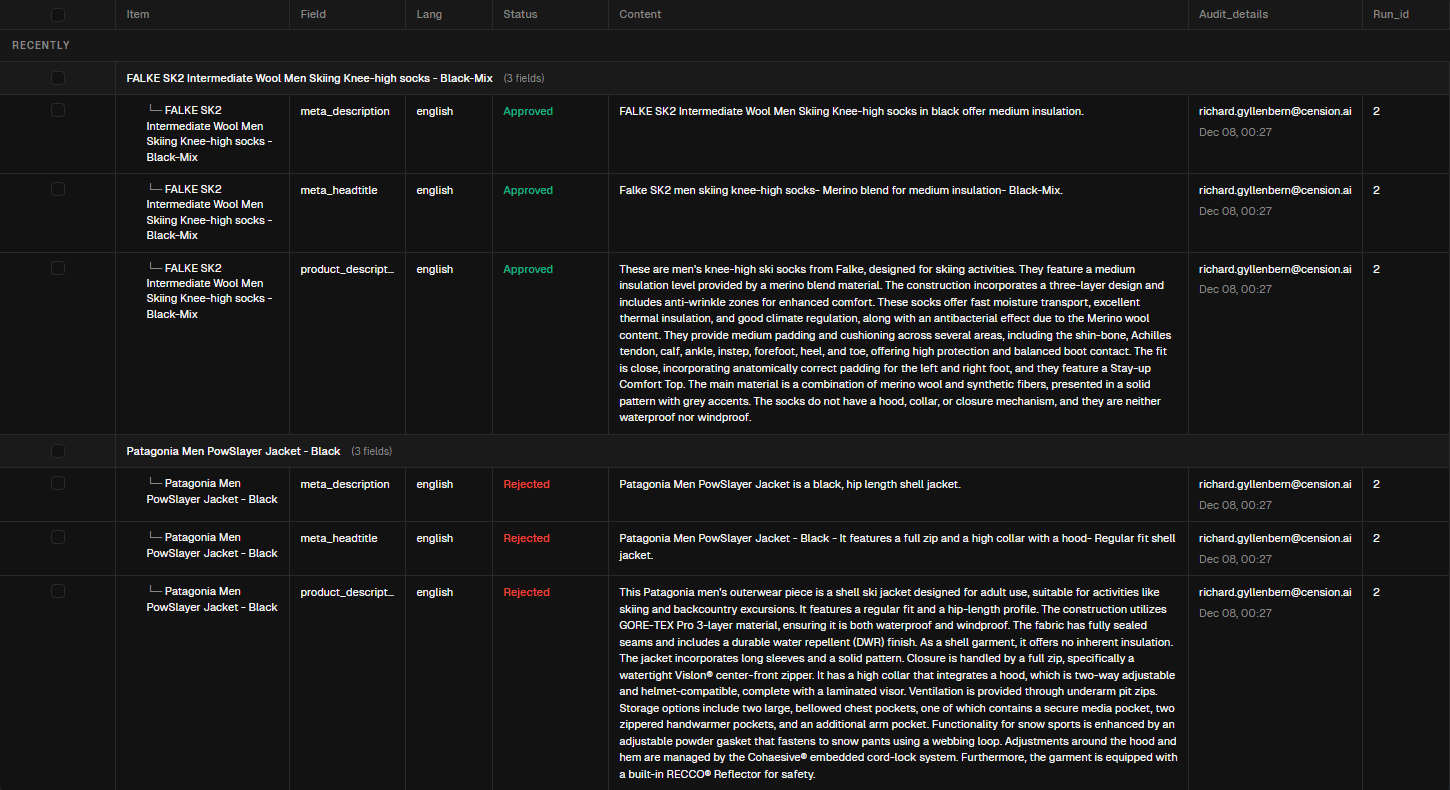
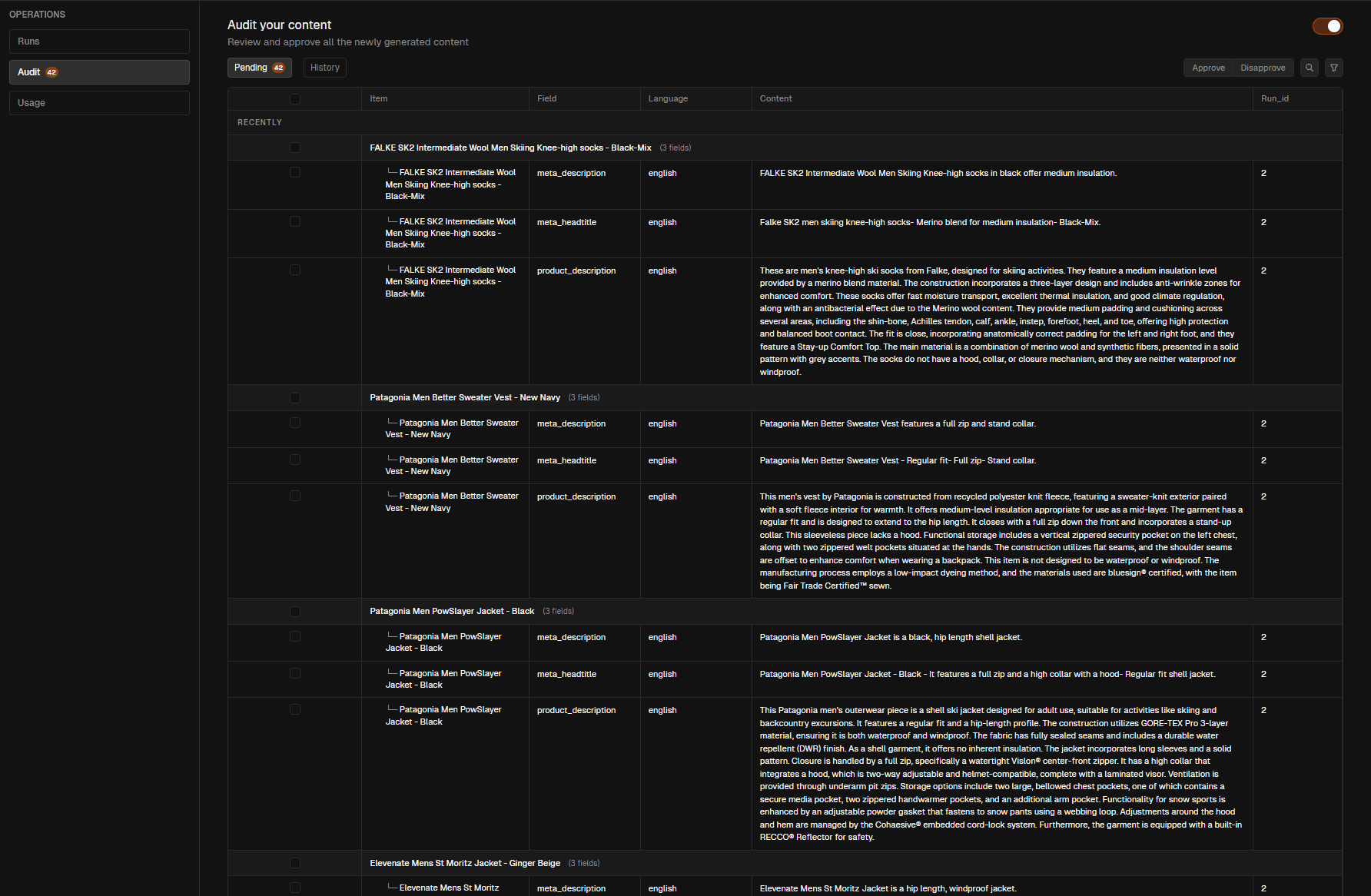
Audit queues capture pending outputs. Approvals and disapprovals are logged with actors and timestamps for accountability.
Cost clarity by default
Per-run usage and cost breakdowns with exportable logs keep spend visible and predictable across teams.
Timeline visibility for every job
Inspect each run with scope, status, processed items, and token usage so you can rerun, resume, or move to audit with confidence.
From run to review to release
Run and monitor
Kick off processing and watch statuses update in real time.
Each run shows scope, processed vs. total items, and token usage so you can intervene or rerun quickly.
Audit with context
Approve or disapprove with the details you need.
Pending queues surface fresh outputs; every decision is captured with who decided, when, and why.
Publish downstream
Ship only what meets the bar.
Pair approvals with exports and automation so only reviewed rows move to feeds, APIs, and schedules.
See every run with full context
Statuses, processed counts, timestamps, and tokens are captured for every job. Filter by state, drill in, and rerun without losing context.
Status clarity
View running, succeeded, or failed runs with start and end times so owners can react fast.
Scope and outcomes
See what was processed, which columns were targeted, and how many items completed vs. remaining.
Rerun with intent
Restart failed runs or extend successful ones without rebuilding setup—stay anchored to the same dataset context.
Related pages
Approve or disapprove with confidence
Pending, approved, and disapproved items stay organized with full lineage. Every decision is logged so you know who cleared what and when.
Pending queue
Review fresh outputs before they ship. Move items to approved or disapproved with a single action.
Decision history
Each approval or disapproval records the actor, timestamp, and context so teams stay accountable.
Guardrails for exports
Only approved rows flow into downstream exports and automation, keeping public outputs compliant and on-brand.
Related pages
Stay on budget while you scale
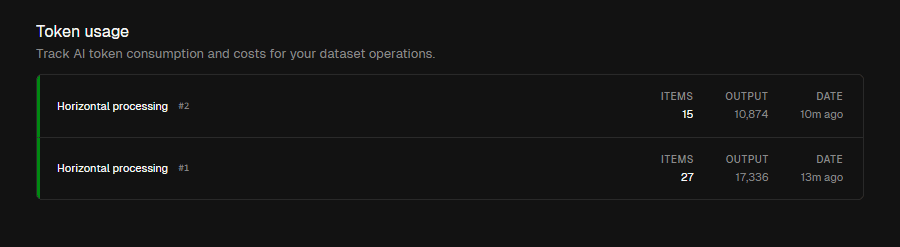
Per-run token and cost breakdowns keep finance and ops aligned. Export logs or pair with plan limits to stay predictable.
Per-run breakdowns
See tokens, time, and model usage for each run so you can compare outcomes and costs.
Exportable logs
Download usage logs to share with finance or operations without leaving the page.
Plan-aware controls
Pair usage with plan context and daily limits from automation so spend stays within agreed thresholds.
Related pages
Know what to watch and when to act
Quick reference for runs, audit decisions, and spend controls so teams can react without guessing.
Processing visibility
See status, processed items, and tokens for every job so you can rerun or extend with confidence.
Filter by running, succeeded, or failed
Drill into scope and targeted columns
Rerun from the same dataset context
See status, processed items, and tokens for every job so you can rerun or extend with confidence.
Filter by running, succeeded, or failed
Drill into scope and targeted columns
Rerun from the same dataset context
Run transparency
Every job shows status, scope, and processed counts.
Audit guardrails
Approvals/disapprovals gate what reaches exports and automation.
Usage visibility
Tokens and cost per run with exportable logs for finance.
Filter & focus
Filter runs by status to troubleshoot or prioritize review.
Inline actions
Approve, disapprove, or rerun directly from the same context.
Context aware
Stays tied to your selected organisation and project.
Rerun ready
Restart failed runs or extend successes without rebuilding setup.
Export-safe
Approvals guard exports and automation so downstream stays clean.